
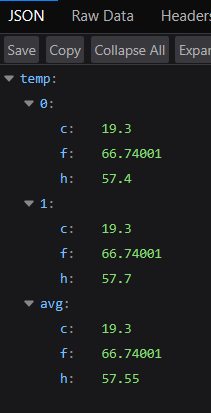
Microcontrollers excel at reading probes; Python excels at caching, authentication, and serving stable HTTPS endpoints. The fast-api-relay project sits between Arduino JSON and the Astro site, normalizing responses and reducing load on fragile embedded stacks.
Why a relay layer helps
Direct browser fetches to a garage IP address break when DNS changes, certificates expire, or the home uplink drops. A relay on a VPS or cloud worker presents one consistent URL, adds Redis caching so dashboards do not hammer the probe, and can aggregate multiple sites if you expand beyond a single garage.
FastAPI responsibilities
- Accept upstream fetches from the Arduino or local network agent on a schedule.
- Store the latest payload in Redis with a short TTL.
- Serve
GET /...responses instantly from cache for the website. - Log stale data when upstream stops updating—useful for alerting.
Example consumer fetch
The Astro site’s fetch layer requests your configured HTTPS URL, parses the temp object,
and maps keys to dashboard probes. The same URL can power Node scripts, Grafana JSON plugins, or
Home Assistant REST sensors.
# Periodic upstream pull (cron or asyncio task)
import httpx

UPSTREAM = "http://192.168.1.50/temp.json"
response = httpx.get(UPSTREAM, timeout=5.0)
response.raise_for_status()
cache.set("garage:latest", response.text)
Operational scripts
Beyond the API, small Python utilities validate JSON schema, backfill CSV archives, or compare probe averages against OpenWeather forecasts. Because probes expose plain JSON, you can prototype analytics in a notebook before promoting logic into production services.
Repository reference
Implementation details, Redis configuration, and deployment notes for the relay are maintained in fast-api-relay. Configure the public relay URL in your temperature feed settings after signing in.