
For portfolios
One dashboard for every property you're responsible for
A vacant rental and a ten-unit portfolio don't share the same monitoring problem. ThermalTrace rolls every property you own into one freeze-risk view, keeps insurance-ready history when something fails, lets on-site managers handle devices without seeing billing, and prices Portfolio for that scale.
Documented proof when a vacant unit fails
A burst pipe in an empty rental can sit unnoticed for days. Landlords and managers need alerts when it starts. and a paper trail afterward for insurance, tenants, and liability questions.
- Claims / insurance evidence pack: freeze-exposure hours, probe tables, and alert timelines you can download or email to an adjuster. Built for rental claims and disputes, not just a homeowner near-miss.
- Per-property history, each unit keeps its own thresholds and readings so you can show what that space was doing before the loss.
- Portfolio alert digest, one rollup when any property needs attention, instead of checking units one by one.
What's already built
This isn't a roadmap item -- it's live functionality every Pro and Portfolio account can use today.
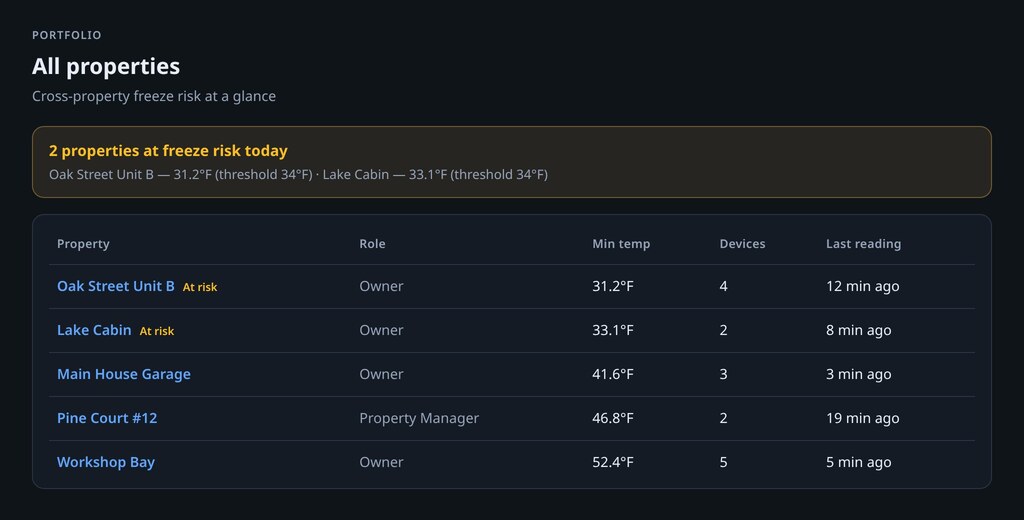
- Cross-property risk dashboard, every property you own in one table: current risk, minimum recent temperature vs. your freeze threshold, device count, last reading.
- Portfolio-wide alert digest: a rollup notification when any property in your portfolio needs attention, instead of watching each one separately.
- Property-manager logins: invite on-site staff or contractors to manage devices and alert settings for one property, with no access to your billing or the rest of your portfolio.
- Claims / insurance evidence pack: verifiable monitoring history for adjusters, carriers, and liability conversations after freeze or leak damage.
- Per-property everything else, each property gets its own device limit, alert thresholds, and history, exactly like a standalone ThermalTrace account would.
Built for the people who actually run these
- Small landlords & property managers: units you don't live in, staff turnover, and ROI that has to beat one unnoticed freeze claim. Manager logins keep on-site access scoped; remove someone and their access ends immediately.
- Vacation-rental owners: cabins and short-term stays sit empty between guests. Watch pipes and spaces during vacancy gaps without giving cleaners or co-hosts billing access. Start on Pro for a handful of places; move to Portfolio when the property count outgrows a personal plan.
Pro vs. Portfolio
Pro already includes the portfolio dashboard and up to 50 owned properties. plenty for a couple of rentals or a vacation home alongside your main house. Portfolio is for real scale: up to 500 properties, property-manager logins, and pricing that reflects a business running many units rather than one person with one house.
Portfolio: $290/yr for up to 500 properties ($29/mo billed monthly). Full plan comparison · Pro pricing
Frequently asked questions
What Portfolio is, who it's for, and how it differs from Pro.
How is Portfolio different from Pro?
Portfolio includes everything on the Pro plan -- SMS/push alerts, official NWS freeze and cold alerts, the claims evidence pack, webhooks, share links -- plus a much higher ceiling on how many properties you can own (Pro already allows up to 50; Portfolio raises that to 500) and it's priced for that scale rather than for a single property.
Do I need Portfolio if I only have 2-3 properties?
Probably not -- Pro already covers a handful of properties (up to 50 owned households) with the same cross-property dashboard and alert digest. Portfolio is built for larger operations: a property-management company or a landlord running many units where a single flat individual price doesn't reflect the scale.
Can my property managers or on-site staff get their own login?
Yes. Invite them with the property-manager role and they can manage devices and alert settings for the property they're assigned to, without seeing your billing, other properties, or account settings.
What happens when a tenant or manager leaves?
Remove them from the household under Dashboard → Household. Their membership is deleted immediately: they lose access to that property's devices, alerts, and history, and they never had billing access to begin with. Pending invites can be revoked the same way before they're accepted.
Do I need a separate ThermalTrace account per property?
No -- one account owns all your properties as separate households, switches between them from the dashboard, and rolls them all up into a single portfolio risk view.
What does the portfolio dashboard actually show?
One table across every property you own: current risk status, minimum recent temperature against your freeze threshold, device count, and last reading time -- so you can see which properties need attention without opening each one individually.
Why does the claims pack matter for rentals?
After freeze or leak damage in a vacant or tenant-occupied unit, insurers and liability questions often turn on when you knew and what you were monitoring. The Pro/Portfolio claims pack turns probe history and alert timelines into a verifiable report you can download or email to an adjuster: documentation for claims, disputes, and carrier conversations.